


FAQ
When do I receive my order?
You will be kept informed of the status of the order by e-mail.
What is a Reproticket?
The Copie-Sjop works in through this website with special student prices, but it can be even cheaper with a repro ticket;
A repro ticket is a digital pass that allows you, as a student, to get even more discounts at CSforStudents. The pass remains valid for 2 years and is strictly personal. You pay 10 euros for this, but you have earned this back very quickly!
I am a TU employee, now what?
As an employee of Delft University of Technology, you can easily and quickly order your required printed matter via this website.
To receive the correct prices, it is important to first create an account. Then email info@csforstudents.nl with your account information and we will activate your account. All prices are then automatically set to TU Delft price level.
How do I change my details?
You can change all your details in ‘My account’ under ‘Addresses’ and ‘Account’.
Can I view my order history?
That is possible. Your order history can be found in My Account under ‘Orders’.
How do I delete my account?
Send an email to info@csforstudents.nl that you want to delete your account (though using the same email address associated with your account).
Please note: you will no longer be able to view the order and payment history of your account.
How do I add an address to my account?
Follow these steps to add an address to your account:
Log in.
>Go to ‘My Account’.
>Click on ‘Addresses’.
You can now click on the ‘add’ button at the Billing address and Shipping address.
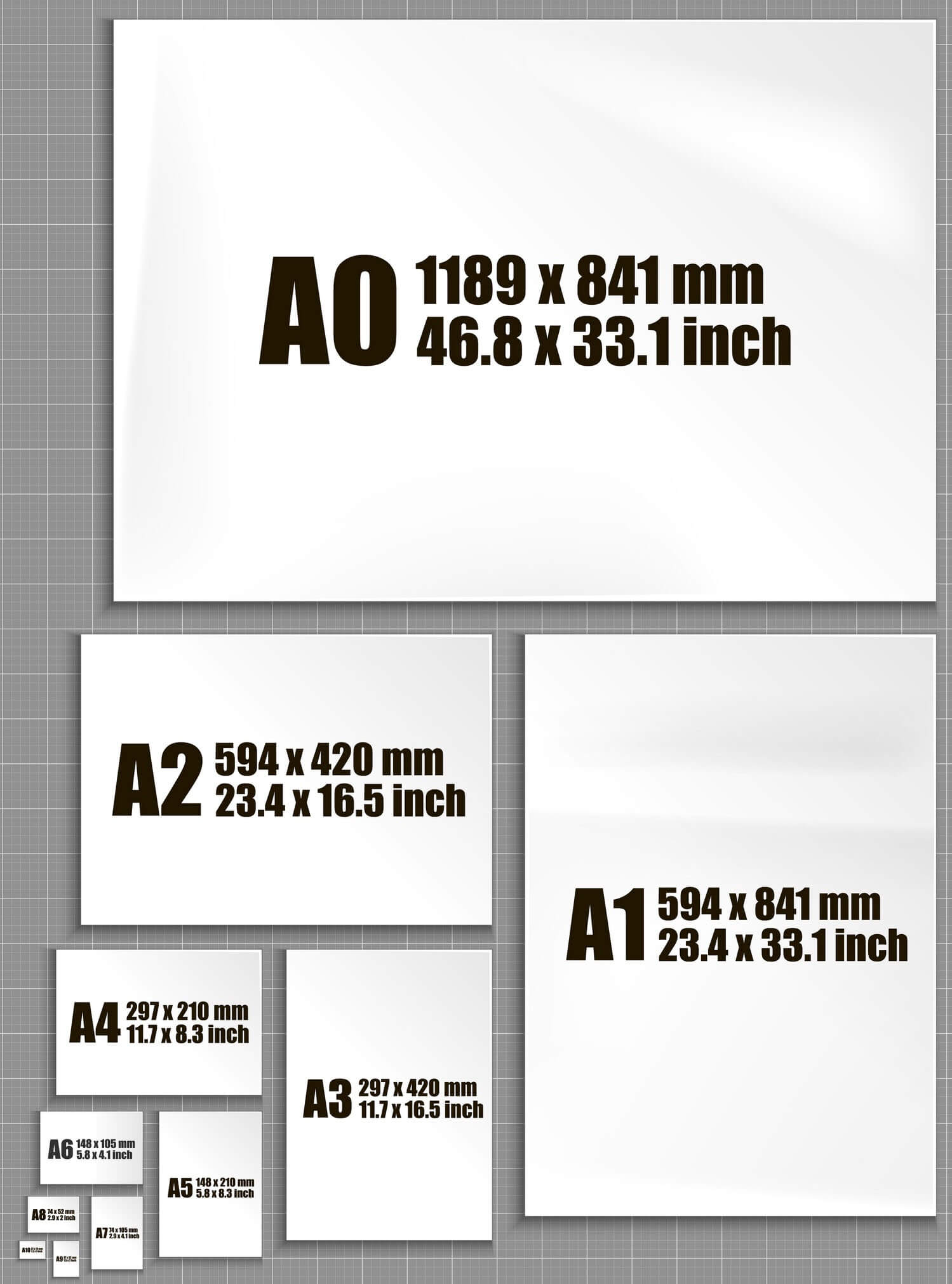
Formaat | |
|---|---|
A0 | 118.9 x 84.1 cm |
A1 | 84.1 x 59.4 cm |
A2 | 59.4 x 42 cm |
SRA3 | 45 x 32 cm |
A3 | 42 x 29.7 cm |
SRA4 | 32 x 22.5 cm |
A4 | 29.7 x 21 cm |
A5 | 21 x 14.8 cm |
A6 | 14.8 x 10.5 cm |
Powis Parker (Glue back)
With Powis Parker, the paper is glued together by means of linen fabric and a thick layer of special glue. It is available in different colours. The glue that is used is very strong and the pages can hardly come off, the only exception is if the paper is thicker than 135 grams. There are several options available as a cover, for example a transparent front and a black or white back made of plastic or cardboard. Powis Parker has a sleek business look and has the look and feel of a bound book.
Metal ring binder (Wire-O)
Wire-O is a commonly used binding method. The metal ring binder is strong and has a businesslike, professional look. There are several options available as a cover, for example a transparent front and a black or white back made of plastic or cardboard.
Number of pages
A page is defined as “one of the sides of a sheet of paper.” A synonym often used is “lace.” This means that two pages can be printed on one sheet of paper.
Circulation
The word “print run” refers to the number of copies of your document or project you want printed.
Print size
When you have the option to print at 100% or adjust to the paper size, it has to do with how the content of the document is printed in relation to the selected paper size.
1. Print at 100%: If you choose print at 100%, the contents of the document will be printed at full size. In other words, the dimensions of the content on the screen match the dimensions of the printed content. This means that if, for example, you have an A4 document and print it at 100% on A4 paper, the size of the content will be the same as what you see on the computer screen.
2. Adjust to paper size: If you choose adjust to paper size, the print setting automatically adjusts the size of the content to fit within the limits of the selected paper size. This may mean that the content is enlarged or reduced to fit within the paper size. For example, if the content is larger than the paper size, it will be automatically resized to fit on the page without cutting anything off. If the content is smaller than the paper size, it will be enlarged to fill the page without leaving white spaces.
The choice between these options depends on the desired presentation of the document and its use.
Spreads
What is a spread?
A “spread” refers to two pages that are adjacent and viewed simultaneously, such as two consecutive pages visible when you open a book. If you work with software such as Adobe InDesign, you can edit the pages as spreads. This is especially useful when the content of the pages overlap, or when the formatting of the two pages needs to be symmetrical.
Can I submit spreads?
At CSforStudents, we do not accept spreads. When you upload a document with spreads, our system cannot process it correctly. Therefore, upload your document as single pages. If you are in doubt about the accuracy of the file you have uploaded, you can view the preview in the order form.
Exit
For products such as Loose Leaf Printing Color, Binding Color or Thesis printing, there is always a bleed (white edge) of 5mm. However, students may also prefer a rimless design. For these cases, we at CSforStudents offer the option to choose SRA4 or SRA3 paper at Loose Leaf Printing Color and Binding Color.
SRA4 and SRA3 are paper sizes larger than standard sizes such as A4 and A3. To create a bleed print, the file is printed on the SRA4 or SRA3 paper. Then the sheet is “cut clean,” so the design runs over the edge of the page, so to speak. You can supply the document with a bleed and/or cut edges to ensure accurate cutting position. If these elements are not included in the file, we will enlarge the documents by 1%. Although this is not visible, it gives us enough space to cut it borderless and clean.
For Thesis printing (A4), we also offer the “A4 – without white border” option.
CSforStudents
Westvest 47
2611AZ Delft
015-2147492
015-2190190 (Copie-Sjop)
info@csforstudents.nl
DM via Instagram